

Volatility Plugins — Plugin window.modscan, ,window.modules Let’s Talk About it

Drivers are the cleanest way for malware to own a Windows system.
Once malicious code executes as a driver:
it runs in kernel mode
it can hook system calls
it can hide processes, files, and registry keys
it can tamper with security tools
This is why rootkits almost always involve drivers.
How Windows Tracks Drivers
Windows maintains multiple views of loaded drivers, just like it does with processes.
Rootkits exploit this.
1. The Linked List (Normal View)
Tracks currently loaded drivers
Used by:
OS components
administrative tools
many security products
2. Raw Memory (Reality View)
Driver code and data may still exist in memory:
even if unlinked
even if unloaded
even if hidden via DKOM
Volatility gives us tools for both perspectives.
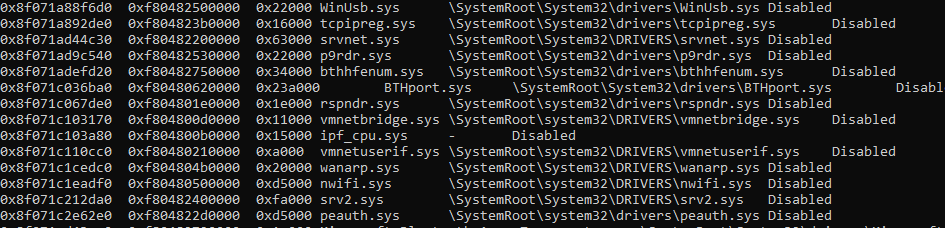
Key Volatility Plugins for Driver Analysis
modules (Volatility 2) / windows.modules (Volatility 3)
Reads the official kernel linked list of loaded drivers
Shows:
driver name
base address
size
file path (if available)
This is your high-level, trusted view — and therefore the first thing rootkits lie to.
If a driver is not here, it does not mean it was never loaded.
modscan (Volatility 2) / windows.modscan (Volatility 3)
Scans memory for:
driver pool tags
remnants of DRIVER_OBJECT structures
Can find:
hidden drivers
unlinked drivers
unloaded drivers
partially overwritten drivers
This is the low-level truth.
If something appears in modscan but not modules: strong rootkit indicator
Why modscan Is Critical
Modern rootkits:
unlink their drivers from the kernel list
overwrite list pointers
erase file-backed references
But:
pool memory still contains artifacts
code pages still exist
data structures are rarely perfectly cleaned
modscan catches what modules misses.
windows.devicetree — Seeing Driver Relationships
The devicetree plugin provides a structural view:
how drivers are layered
which drivers attach to which devices
unexpected filters or middlemen
This is especially useful for:
keyboard filter rootkits
disk filter rootkits
network stack manipulation
Unexpected drivers in the middle of known driver chains are highly suspicious.
Driver Analysis Should Never Be Done Alone
Kernel rootkits rarely stop at “just being loaded.”
They usually:
hook SSDT
hook IRP handlers
register callbacks
manipulate processes and registry
So the real power comes from correlation:
suspicious driver in modscan
SSDT entries pointing into that driver
hidden processes revealed via psxview
These findings reinforce each other.
--------------------------------------------------------------------------------------------
Narrowing Down Suspicious Drivers
When faced with hundreds of drivers:
1. Known-Good Comparison
Compare against:
a clean system
same OS version and patch level
Use projects like:
Vanilla Windows Reference (Andrew Rathbun) (https://github.com/AndrewRathbun/VanillaWindowsReference)
This quickly eliminates the noise.
2. Reputable Research
Search only reliable sources:
Microsoft documentation
vendor driver references
well-known malware research blogs
Ignore forums and random blog posts.
3. Dump and Analyze
If doubt remains:
extract the driver
scan with:
AV engines
known IOCs
perform:
static analysis
reverse engineering
Dumping a Suspicious Driver
Once identified:
Volatility 2
moddump -b <base_address> -D output_dirVolatility 3
windows.modules --dumpThis allows:
string analysis
signature checks
RE
IOC extraction
What To Do After Finding a Malicious Driver
Don’t stop at identification.
Next steps:
search SSDT for hooks into the driver
look for callbacks registered by it
identify persistence mechanisms:
services
registry entries
boot loaders
correlate with:
hidden processes
network artifacts
filesystem anomalies
The driver is the control center.
--------------------------------------------------------------------------------------------
Key Takeaways
Kernel drivers = rootkit backbone
modules shows what Windows admits
modscan shows what memory remembers
Differences between them matter
Known-good baselining is incredibly powerful
Rootkits rarely clean up perfectly
Correlation beats single-plugin analysis every time
-------------------------------------Dean---------------------------------------------


Comments