

Google Takeout: The Quiet Data Exit Nobody Talks About

Let’s talk about one of the most underestimated data exfil paths in Google Workspace.
Not malware. Not OAuth abuse. Not a compromised token.
Just… Google Takeout.
Most people think of Takeout as a harmless “download my data” feature. And to be fair, that was the original idea. But from a security and forensics perspective,
Takeout is a built-in data export mechanism that works surprisingly well — maybe too well.
What Is Google Takeout (Really)?
Google Takeout, also called “Download Your Data”, allows a user to export all the data associated with their Google account into an archive.

This includes:
Gmail
Google Drive
Calendar
Contacts
Sites
And many other Workspace services

Originally, Takeout existed to make Google feel more transparent and user-friendly.“Your data belongs to you — take it with you.”
For example:
Moving from a free Gmail account to Google Workspace
Leaving an organization
Personal backups
All valid use cases.
The problem?
Takeout is enabled by default. You can disable it if wanted

Even for:
New organizations
Enterprise licenses
Security-conscious environments
-------------------------------------------------------------------------------------------------------------
Why Takeout Is a Risk in Enterprises
Here’s where the threat model changes.
In Google Workspace:
Any user can export their own data
Group Owners can export entire group content, including email
Data can be exported outside Google’s ecosystem
That last point matters a lot.
Because Takeout doesn’t just download data into Google Drive — it can push data directly to:
Dropbox
OneDrive
Box
Other third-party cloud storage providers
From an investigation standpoint, that’s terrifying.
Once data leaves Workspace and lands in a third-party cloud:
You may have zero visibility
You may have zero access
You may not even know what was exported
-------------------------------------------------------------------------------------------------------------
What a Takeout Export Looks Like for a User
From the user’s perspective, the process is almost boringly simple.
They go to:
From there:
They select which services they want to export
Choose how the export should be packaged (single archive or multiple ZIP files)

Choose how the data should be delivered
Most users stick with the default:
Email notification with a download link

But again — exporting to external storage is just a few clicks away.
-------------------------------------------------------------------------------------------------------------
Timing Matters: Takeout Is Not Instant
One thing that helps defenders (a little) is that Takeout isn’t immediate.
Exports are processed in the background. The time depends on:
How many services are selected
How much data exists in each service

Users can monitor progress in “Manage your exports”, where they’ll also see a history of previous exports.
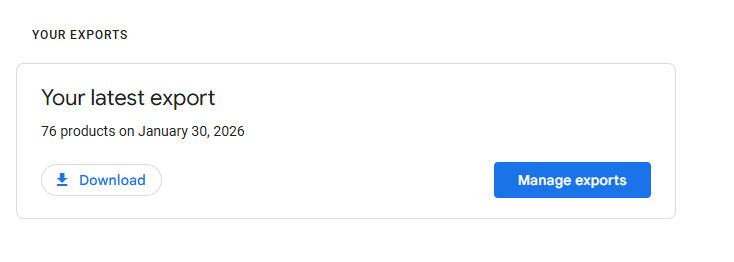
From an IR perspective, this delay gives you a narrow window:
To detect
To respond
To disable access before completion
But only if you’re looking.
-------------------------------------------------------------------------------------------------------------
What Actually Gets Logged (And What Doesn’t)
This is where things get subtle.
Google Workspace has a dedicated Takeout Audit Log. That’s good news.

The log records:
Which user initiated a Takeout export
When it started
Which services were included
The IP address used
When the export finished packaging

What it does not log:
Whether the user downloaded the data
Whether the data was accessed after packaging
Whether data was successfully imported into a third-party cloud
Once you see the “export completed” event, you should assume:
The data is gone.
Especially if the destination was external storage.
-------------------------------------------------------------------------------------------------------------
Important Forensics Gotcha: No API Access
Here’s a big one that catches teams off guard.
Takeout Audit Logs are NOT available via the Google Workspace API.
That means:
If you rely only on API-based log collection
If your SIEM pipeline pulls Workspace logs via API
You will miss Takeout activity entirely.
This is one of the few highly forensically relevant logs that requires:
Manual Admin Console access
Or native Workspace log review
The IP address in this log becomes extremely valuable, because it’s often the only reliable pivot point to correlate:
Login events
OAuth activity
Drive access
Suspicious sessions

-------------------------------------------------------------------------------------------------------------
Where the Data Goes After Packaging
Once Takeout finishes building the archive, users can:
Download it directly
Access it via Google Drive
Or let it be pushed to third-party storage
If the archive lands in Google Drive:
Access to the ZIP files is logged in Drive Audit Logs
If it goes to external storage:
Logging ends at “export completed”
At that point, Workspace visibility stops.
-------------------------------------------------------------------------------------------------------------
Customer Takeout: When Admins Export Everything
Now let’s talk about the nuclear option.
Google Workspace also supports Customer Takeout, which allows a Super Admin to export all data in the organization.
This includes:
User data
Vault data
Data under legal hold
Data subject to retention rules
This is powerful — and dangerous.
-------------------------------------------------------------------------------------------------------------
Restrictions (And Why They Exist)
Google doesn’t let just anyone do this.
To perform Customer Takeout:
You must be a Super Admin
MFA must be enabled
Workspace must be older than 30 days
Organization must have less than 1000 users
These restrictions exist for good reason — but if a threat actor compromises an admin account that meets these conditions, Customer Takeout becomes a single-click mass exfiltration tool.
-------------------------------------------------------------------------------------------------------------
The Big Picture: Why Takeout Matters in DFIR
Takeout isn’t flashy. It doesn’t trigger AV alerts. It doesn’t bypass MFA. It doesn’t exploit anything.
And that’s exactly why it works.
From an attacker’s perspective:
It’s legitimate
It’s built-in
It’s trusted
It’s quiet
From a defender’s perspective:
Logging is limited
API visibility is missing
Exfil can be complete before alarms go off
-------------------------------------------------------------------------------------------------------------
Final Thoughts
If you’re defending or investigating Google Workspace environments, Takeout needs to be part of your mental threat model.
Not because it’s malicious by design — but because it doesn’t need to be.
All it requires is:
Access
Time
And a user (or admin) clicking a few buttons
------------------------------------------------Dean-------------------------------------------------------


Comments