

The Run Dialog: Small Key, Loud Evidence

Press Windows + R. Type something. Hit Enter. That's it — that's the entire user interaction. What happens in the registry afterward is far more interesting.
The Run dialog has existed since Windows XP and hasn't changed much since. It's the power user's shortcut — a quick way to launch applications, open specific paths, fire up system tools, or connect to network resources without touching a mouse. Most casual users have never opened it. The ones who have tend to use it constantly.
And that habit leaves a very clean trail.
------------------------------------------------------------------------------------------------------------
Why This Key Matters
The Run dialog skews heavily toward technically proficient users — administrators, power users, developers, and, notably, attackers operating on a compromised machine.
Someone who knows to press Win+R and type \\192.168.1.1\c$ to map a network share, or regedit to open the registry editor, or cmd /k whoami to check their privilege level — that's not an accidental user. That's someone who knows exactly what they're doing.
Every command typed into that dialog gets preserved at:
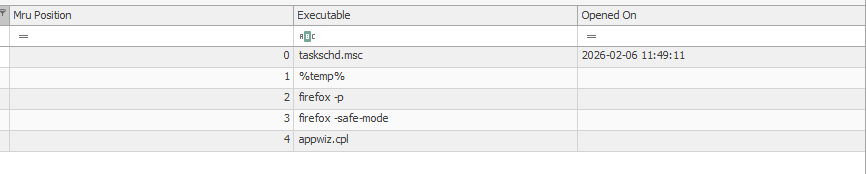
NTUSER\Software\Microsoft\Windows\CurrentVersion\Explorer\RunMRUThe key maintains a full MRU list — most recent entry at position 0, with the Last Write Time of the key anchoring precisely when that most recent command was typed. Everything else in the list is ordered by recency, giving you a sequenced history of every Run dialog command this user ever typed on this machine.
------------------------------------------------------------------------------------------------------------
------------------------------------------------------------------------------------------------------------
Reading the List Like an Analyst
The MRU ordering is your friend here.
Position 0 is the most recent command — timestamped.
Everything below it is ordered from most to least recent, giving you a behavioral sequence even without individual timestamps.
That sequence is often more revealing than any single entry.
A list that shows notepad → calc → explorer is a normal user having a normal day.
A list that shows powershell -ep bypass -w hidden → cmd /k whoami /priv → \\192.168.1.50\c$ → regedit is someone working through a deliberate playbook.
Commands worth flagging immediately:
UNC paths (\\hostname\share or \\IP\share) — direct navigation to network resources
PowerShell with execution policy bypass flags or hidden window arguments
whoami, net user, net localgroup — reconnaissance commands
runas — privilege escalation attempts
Registry paths typed directly — someone who knows exactly where they're going in the registry
Remote management tools — mstsc, psexec, wmic
The Run dialog is a power user feature. When you find it populated with sophisticated commands, you're not dealing with someone who stumbled onto the machine. You're dealing with someone who knew exactly what to type — and left every keystroke in the registry for you to find.
---------------------------------------------Dean--------------------------------------------------------
Full Registry forensic Series:


Comments