

CloudTrail — Your Primary Source of Evidence in AWS

If there's one log source you need to master for AWS investigations, it's CloudTrail. Every API call made in your AWS environment — whether it's someone logging into the console, a Lambda function creating a storage bucket, or an attacker enumerating your IAM roles — gets recorded here. This is your event log for the cloud.
-------------------------------------------------------------------------------------------------------------
What CloudTrail Actually Is
▸ Default: 90 days free (management events only) | Trail: unlimited retention + data events

CloudTrail records API calls made to AWS services. Think of it like Windows Event Logs, but instead of OS-level events, it's capturing every interaction with the AWS control plane.
When someone creates a virtual machine, uploads a file, adds an IAM user, or changes a firewall rule — CloudTrail sees it and logs it.
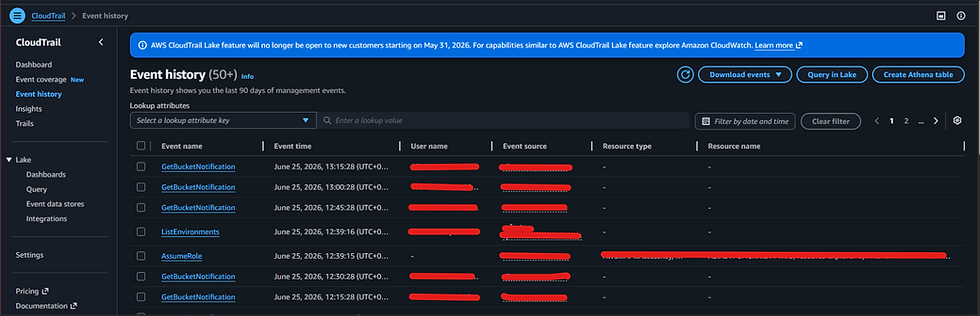
CloudTrail is turned on by default and stores 90 days of management events at no cost.
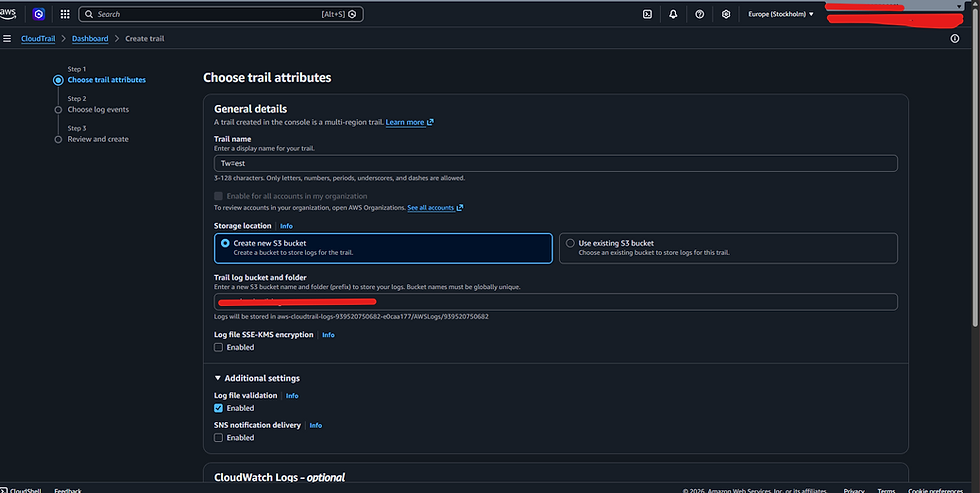
To keep logs beyond 90 days, you need to create a trail routing logs to an S3 bucket.
All timestamps in CloudTrail are UTC.
CloudTrail does not capture what's happening inside your EC2 instances — only AWS API calls. For in-instance activity, you still need EDR/XDR.
💡 IR Tip: CloudTrail is not a replacement for EDR. It tells you what happened at the cloud control plane level. It won't tell you what commands ran inside a compromised EC2 instance or what files were created on disk.
-------------------------------------------------------------------------------------------------------------
Management Events vs. Data Events — This Distinction Matters
Management Events = control plane (who did what to the infra) |
Data Events = data plane (what touched the data)

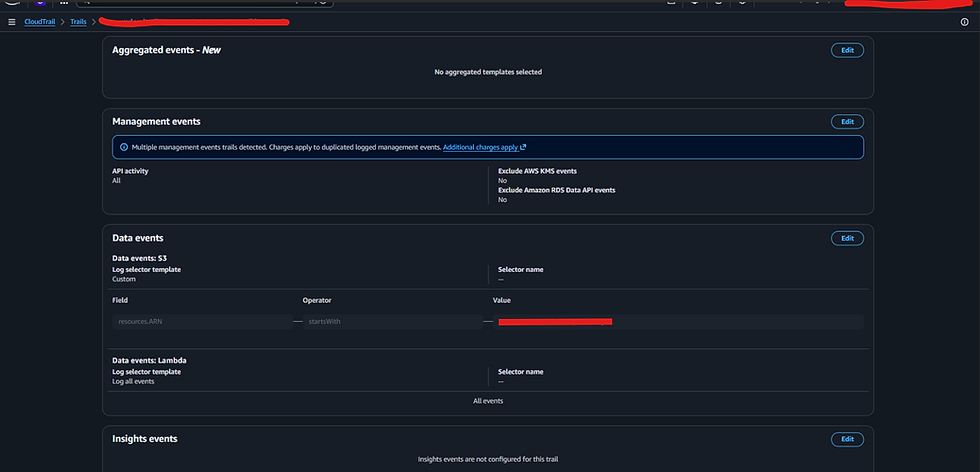
Management events are control-plane interactions — creating, configuring, or deleting resources.
Examples: creating an S3 bucket, launching an EC2 instance, adding an IAM user, modifying a security group. These are enabled by default with 90 days free retention.
Data events capture interactions with data inside a service — reading/writing S3 objects, invoking Lambda functions, querying RDS. These are OFF by default. If you're investigating S3 data exfiltration and data events weren't enabled — you have a gap in your evidence.
💡 IR Tip: One of the first questions to ask when you arrive at an AWS incident: 'Do you have a CloudTrail trail? Are data events enabled?' If the answer is no to either, you're working with partial logs. Establish what you have early.
-------------------------------------------------------------------------------------------------------------
CloudTrail SLA: How Fast Do Logs Appear?
CloudTrail has a maximum SLA of 15 minutes. An API call could take up to 15 minutes to appear in your logs.
Compare this to Azure where the SLA is 30 minutes to 24 hours — AWS is significantly faster.
But if your attacker is moving quickly, even 15 minutes can be too late, which is exactly why GuardDuty runs continuously against incoming CloudTrail events.
Reading CloudTrail Fields Like an Investigator
eventTime — When the event was recorded, in UTC. Your timeline anchor.
userIdentity — Who triggered this event. Most important field for attribution.
eventSource — Which AWS service generated the event (ec2.amazonaws.com, iam.amazonaws.com, s3.amazonaws.com).
eventName — The actual API call: ConsoleLogin, RunInstances, CreateAccessKey, GetObject. Learn these names.
awsRegion — Which region processed this call. Critical for finding the right resources.
sourceIPAddress — Where the call came from. Your geolocation and pivot point.
userAgent — How the request was sent: signin.amazonaws.com (console), aws-cli (CLI), lambda.amazonaws.com (Lambda function).
requestParameters / responseElements — Full JSON payload of what was requested and returned. Contains bucket names, file keys, instance IDs, created keys.
sessionCredentialFromConsole — Boolean: did this API call come from the web console?
Example:
{
"eventVersion": "1.11",
"userIdentity": {
"type": "AssumedRole",
"principalId": "*",
"arn": "*",
"accountId": "*",
"accessKeyId": "*",
"sessionContext": {
"sessionIssuer": {
"type": "Role",
"principalId": "*",
"arn": "*",
"accountId": "*",
"userName": "*"
},
"attributes": {
"creationDate": "2026-06-25T10:55:09Z",
"mfaAuthenticated": "false"
},
"ec2RoleDelivery": "*"
},
"inScopeOf": {
"issuerType": "*",
"credentialsIssuedTo": "*"
}
},
"eventTime": "2*",
"eventSource": "*",
"eventName": "UpdateInstanceInformation",
"awsRegion": "us-east-1",
"sourceIPAddress": "*",
"userAgent": "*",
"requestParameters": {
*
},
"responseElements": null,
"requestID": "*",
"eventID": "*",
"readOnly": *,
"eventType": "AwsApiCall",
"managementEvent": true,
"recipientAccountId": "*",
"eventCategory": "Management",
"tlsDetails": {
"tlsVersion": "*",
"cipherSuite": "*",
"clientProvidedHostHeader": "*"
}
}
-------------------------------------------------------------------------------------------------------------
ARN — Understanding Amazon Resource Names
▸ Full ARN: arn:aws:iam::417823659031:user/Dean

The ARN format: arn:partition:service:region:account-id:resource-type/resource-idExample:
arn:aws:iam::417823659031:user/Dean— partition=aws, service=iam (global, no region), account=417823659031, type=user, name=Dean
Access Key ID Prefixes — Decoding the Key Type
AKIA — permanent access key for an IAM user. High-risk: static, doesn't expire, can be accidentally exposed.
ASIA — temporary STS token. These expire. Key indicator of lateral movement via the metadata service.
AIDA — IAM user authenticated via the console (not using an API key).
AROA — a role made this call, not a user directly.
💡 IR Tip: When you see ASIA tokens appearing for a role that shouldn't be requesting temporary credentials — especially with an unusual source IP — you may be seeing an attacker who accessed the EC2 metadata service and stole STS credentials to impersonate that instance's IAM role.
-------------------------------------------------------------------------------------------------------------
Setting Up CloudTrail Trails
If no trail is configured, you lose all CloudTrail data older than 90 days permanently. A trail routes logs to an S3 bucket you control. Configure it at the organisation level so every account that joins automatically sends logs to your central S3 bucket.
⚡ Update (2024): AWS introduced CloudTrail Lake — a managed event data store that lets you query CloudTrail events directly using SQL without needing S3, Glue, or Athena setup. For new deployments, CloudTrail Lake is often simpler than the S3+Glue+Athena pipeline.
-------------------------------------------------------------------------------------------------------------
What's Next
Next Articles goes into the actual investigation scenarios — how to track console logins, detect new API key creation, find evidence of exposed keys being abused, and run CloudTrail threat hunts.
----------------------------------------Dean---------------------------------------------------------


Comments