

Speaking AWS — The Language Every IR Investigator Needs to Know

If you've ever walked into an AWS incident and felt like the engineers around you were speaking a completely different language — you're not alone. AWS has its own vocabulary, its own structure, and its own quirks. Before you can even begin to scope an investigation, you need to understand what you're actually dealing with.
Think of this article as your field translator.
We're going to walk through how AWS is organised, how identity works, and the different ways someone — legitimate or otherwise — can get access. Once you understand these fundamentals, everything else in the AWS forensic world starts making sense.
How AWS is Organised: Accounts, Sub-Orgs, and the Root of Trust
Diagram: AWS Organizations Hierarchy
▸ IR Role defined at Management Account level = read-only access to ALL accounts below it

AWS environments in most enterprises aren't just a single account. They're built around something called AWS Organizations — a structure that lets a company group all their individual AWS accounts under one umbrell
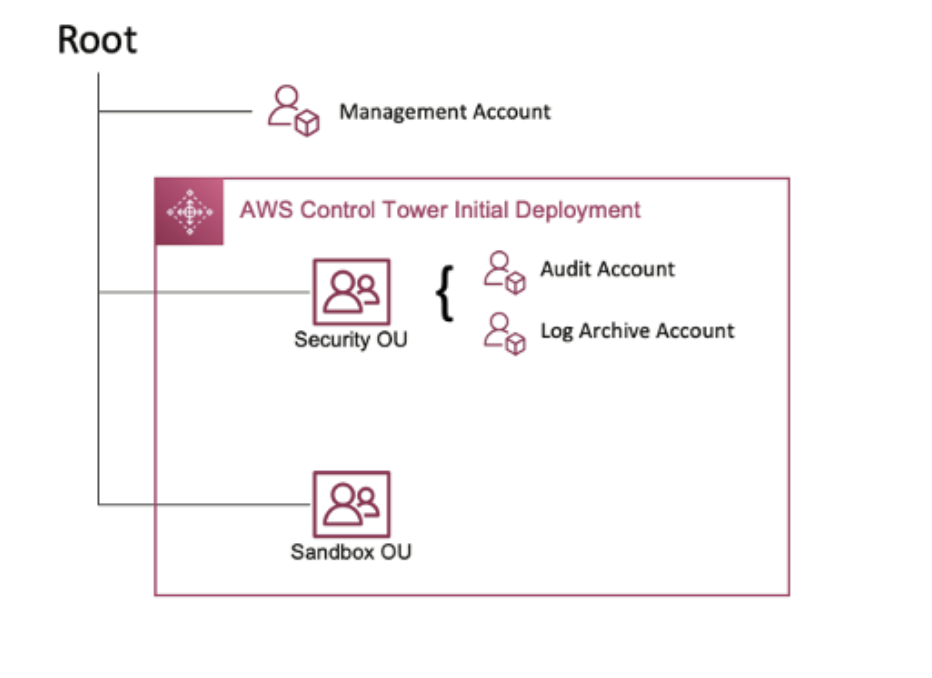
Picture it like a company's Active Directory forest. You have:
A Management Account — this is the root of trust. It controls everything below it. Think of it as the domain root. Very few people should ever touch this account.
Sub-Organizations (Sub-Orgs) — these sit below the management account and typically align to business units or purposes (Production, Development, QA). Roles defined at this level apply to all accounts beneath them but not to adjacent sub-orgs or the management account.
Individual AWS Tenants (Accounts) — the actual working environments where resources live. Roles here only affect resources within that one account.
For an IR team, the goal is to get a role at the management account level that gives you read-only access across the entire organisation. That's your holy grail — you can see everything without touching anything.
The typical way to set this up is with a cross-org IAM role tied to a dedicated security account that sits completely outside the compromised org.
IR Tip: Never put your IR account inside the same organisation you're investigating. If the threat actor has organisation-level access, they could tamper with your investigation account. Keep it separate and use a cross-org trust.
-----------------------------------------------------------------------------------------------------
IAM — The Backbone of Everything
IAM stands for Identity and Access Management. It's the gatekeeper for every single action in AWS. Whether you're creating a virtual machine, downloading from a storage bucket, or running a script — IAM is what decides if you're allowed to do it.
For those coming from a Windows background:
IAM is your Active Directory.
For UNIX people:
it's like NIS (Network Information Service). It's the central authority for who is who and what they can do.
--------------------------------------------------------------------------------------------------------
Root vs. IAM Accounts — Know the Difference
Every single AWS account has a Root account. This is the nuclear option — it has absolute control over everything in that account and cannot be restricted by IAM policies. AWS actively discourages logging into root except when absolutely necessary.
Every other user or service runs as an IAM account. These can be authenticated with a password, an API key, or both. Unlike root, IAM accounts have roles and policies that define exactly what they're allowed to do.
IR Tip: If you see CloudTrail logs with the root account being used repeatedly, that's a flag. In a properly managed environment, root should barely ever appear. Lots of root activity could mean bad security hygiene or a compromised account.


AM Policies and Roles — How Permissions Actually Work
▸ Inline Policy → attached directly to the identity
▸ Managed Policy → reusable across identities

Permissions in IAM come in three layers:
Policy — the most granular unit. A policy is a JSON document that explicitly lists which API calls are allowed or denied against which AWS resources.

Predefined Roles — AWS ships these out of the box for every service. You'll see things like 'S3FullAccess' or 'EC2ReadOnly'. They're meant as examples — most organisations should refine them.

Custom Roles — these combine predefined roles with your own policies to create exactly the right level of access for a specific job. The tighter, the better.

Here's what a dangerously over-permissive policy looks like — and unfortunately you'll find versions of this in real environments:
{
  "Version": "2012-10-17",
  "Statement": [
    {
      "Effect": "Allow",
      "Action": "*",
      "Resource": "*"
    }
  ]
}
That's an administrator policy.
Action: * means every API call. Resource: * means every AWS resource.
If an EC2 instance with this policy attached gets compromised, the threat actor effectively has admin access to your entire AWS account. We see this constantly — a developer can't get something working, slaps on this policy to make the problem go away, and then forgets about it.
When you're investigating a compromised IAM account or role, you must expand and review every custom policy attached to it. Predefined roles can include inherited permissions that aren't obvious at first glance.
IR Tip: AWS provides the IAM Policy Simulator — use it to test what a given user or role can actually do. It's invaluable for scoping an incident once you've identified a compromised identity.

-------------------------------------------------------------------------------------------------------------
Four Ways to Access AWS — and What Each One Means for You
Understanding how access is granted is critical because different access methods leave different evidence trails and carry different risks.
1. Username and Password
The most familiar method — log in to the AWS web console with your email and password. The limitation here is that it only works for the web console. AWS CLI, SDK scripts, and automation can't use username/password.
From an IR perspective, these are the credentials most at risk of phishing and account takeover. Without MFA, a stolen password is game over for that account.
2. API Keys
This is how most real-world automation interacts with AWS. API keys come in two parts: an Access Key ID and a Secret Access Key. You can create them per-user, per-service, or per-role.
The risk?
API keys don't expire by default. They're static credentials. And bug bounty hunters, as well as threat actors, are constantly scanning public GitHub repositories, Pastebin, and Docker image layers looking for accidentally exposed keys. One exposed key in a public repo and your entire AWS environment could be compromised within minutes.
💡 IR Tip: Search for your organisation's API keys on GitHub using search operators like: 'AKIA' filename:.env — AKIA is the prefix that identifies AWS access keys. We cover key prefixes in Article 2.
3. SAML Tokens
SAML (Security Assertion Markup Language) tokens are time-limited credentials that expire after a window you define — seconds, minutes, hours. They're generated through the AWS STS (Security Token Service) and are perfect for temporary, one-time access scenarios without managing permanent keys.
4. IAM Roles Assigned to Resources
This is the cleanest approach from a security standpoint — attach an IAM role directly to an EC2 instance or other resource. The resource then gets permission to call AWS APIs without any hard-coded credentials anywhere. No credentials to steal in theory.
In practice, this becomes a favourite attack path via the metadata service, which we cover in Article 9.
-------------------------------------------------------------------------------------------------------------
The AWS Shared Responsibility Model — Know Where Your Boundary Is
One thing that catches organisations off guard is thinking AWS is responsible for securing their data. That's not how it works.
AWS secures the underlying infrastructure — the physical data centres, the hypervisor layer, the hardware.
Everything you build on top of that? That's your responsibility.
You configured the S3 bucket — you're responsible for who can access it.
You launched the EC2 instance — you're responsible for patching the OS and securing access.
You created the firewall rules — you're responsible for what traffic is allowed.
The line is simple: if AWS manages the underlying service, they secure it. If you chose to run it, you secure it.
💡 IR Tip: When starting an AWS investigation, always establish the shared responsibility boundary first. Understanding what AWS can help you with and what you have to find yourself will save you time and help you ask the right questions when talking to AWS support.
-------------------------------------------------------------------------------------------------------------
What's Next
Now that you understand the structure and identity layer of AWS, the next article dives straight into CloudTrail — your primary audit log for every action taken in an AWS environment. We'll walk through what gets logged, what doesn't, and how to read the raw log fields like an investigator.
-----------------------------------------------------Dean---------------------------------------


Comments