

SentinelOne Detection Center — Library Rules, Emerging Threats, and What It All Actually Means

Okay so if you've been following this SentinelOne series, you know we've covered a lot of ground.
Complete Series:
But this one is genuinely exciting — SentinelOne just dropped something that takes a big burden off security teams, especially those who don't have the time or expertise to write custom detection rules from scratch.
It's called the Detection Center, and the headline feature is the Library tab — a collection of pre-built detection rules created by the SentinelOne research team that you can switch on immediately.
No query writing.
No logic to figure out.
Just activate and go.

Before we dive in, I actually researched more about this — things that weren't immediately obvious from the documentation. And Answers cleared up a lot of confusion, and I'm including everything that I learned throughout this article. So this isn't just a feature walkthrough — it's the feature walkthrough plus the answers you'd get if you spent 60 minutes researching more or asking support team.
-----------------------------------------------------------------------------------------------------------
What Is the Detection Center?
The Detection Center is the new unified home for all your detection rules — both the ones you write yourself and the ones SentinelOne's research team maintains. You get to it from the sidebar: click Detections.

It has two tabs:

Custom tab — this is where your own rules live. Everything you've built, everything you're managing yourself. You can view, edit, create, and manage rules here.

Library tab — this is the new bit. Pre-built, advanced detection rules from the SentinelOne research team, ready to activate. The full-screen view shows you each rule's name, description, severity, MITRE tactics, data source, category, status, and when it last triggered an alert.

One important thing to understand up front: the Detection Center is available in the Singularity Operations Center (SOC) interface only. If you're still on the legacy Management Console, you won't see the Library tab there. More on why that matters in a moment.
-----------------------------------------------------------------------------------------------------------
The Question I Researched— Console Availability
When I first saw that library rules were only in the SOC interface, my immediate question was: why? And more importantly — if I enable rules in SOC, do they do anything if I'm still partly using the legacy console?
Here's exactly what I found:
-----------------------------------------------------------------------------------------------------------
How Library Rules Are Different From Your Existing Detection Engines
This was probably the most important question I had.
SentinelOne already has detection engines — behavioral AI, static AI, reputation — so what exactly do these library rules add?
The answer is that they're entirely separate. The engines run automatically on endpoint activity using SentinelOne's core AI. Library rules are query-based — they look at your telemetry data (stored in Singularity Data Lake) and fire when a specific set of conditions is met. You're essentially telling the platform "alert me whenever X, Y, and Z happen together."
They don't replace the engines. They sit alongside them and expand what you can detect — especially for scenarios the engines weren't built for, like cloud activity, identity events, or very specific behavioral patterns that require correlating multiple data points.
-----------------------------------------------------------------------------------------------------------
The Three Categories of Library Rules
Not all library rules behave the same way. SentinelOne has split them into three enablement categories, and understanding this is important before you start activating things.
Auto enabled by default — these are turned on across all environments automatically. You don't need to do anything. You can disable them if they're not right for you, and your opt-out choice will be remembered even after platform updates.

Disabled by default — available in the library but you have to manually switch them on. These are typically more specialised rules that don't make sense for every environment.

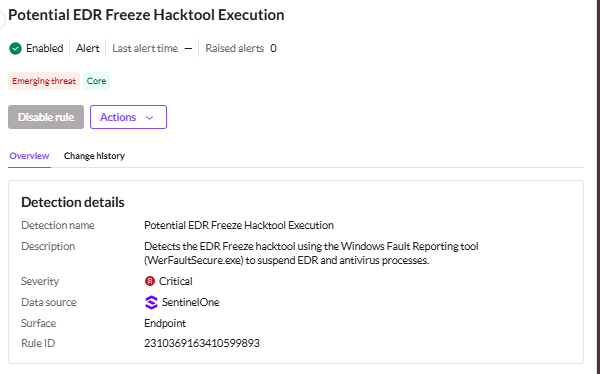
Emergency detection — this category is activated immediately in response to global outbreaks. If there's a major zero-day or widespread attack campaign happening, SentinelOne can push these out automatically.

Example: Emergency detection
-----------------------------------------------------------------------------------------------------------
Most Important Emerging Threat and Core Rule Labels
Inside the library you'll see two label types on certain rules: Emerging Threat and Core. Here's what they mean.

Core rules are rules that SentinelOne recommends for most environments — broadly applicable, well-tested detections.
Emerging Threat rules are specifically about evolving cyberattacks — newer tactics, active campaigns, things that are happening right now rather than established patterns.
You can bulk-activate rules by label using the Automatic Detections by type button in the top-right corner of the Detections dashboard. Click it, select the labels you want, and hit Save. When an alert is triggered by one of these labelled rules, the label appears next to the alert name in the Alerts page.

One display note from the documentation: due to space constraints in the UAM drawer, only a single label is shown even if a rule has both. Emerging Threat takes display priority over Core.
-----------------------------------------------------------------------------------------------------------
Activity Logs — What Gets Recorded When You Change Rules
Every time you enable or disable Emerging Threat or Core rules at any scope level, an activity log entry is generated. This matters for audit trails and change management.
-----------------------------------------------------------------------------------------------------------
My Question About EDR-Specific Rules
Here's something that genuinely confused me when I first looked at the library.
A lot of the rules are for CloudTrail, Okta, and other non-endpoint sources.
So I wanted to know : is there a way to filter down to just the rules that are relevant to traditional EDR?
Their answer was simple and useful:

-----------------------------------------------------------------------------------------------------------
New Workflow Features — Alert Simulation and Multi-Instance View
Two more features worth calling out quickly.
Alert Simulation lets you test a rule against recent ingested data before activating it in your live environment. You can see what alerts would have fired without triggering any actual responses or mitigations. It's available for rules using Query Language 2.0. Rules with protected logic or scheduled intervals won't show the simulation option.

Multi-instance view lets you open multiple rules side-by-side in floating panels for comparison. You can resize panels, keep them minimised at the bottom of the screen, and copy details
without losing your place in the main rule list.
Example:

-----------------------------------------------------------------------------------------------------------
Quick Reference
------------------------------------------------------Dean--------------------------------------------------
Why This Feature Is a Big Deal
Here's my honest take on this — and the reason I wanted to write about it.
Most security teams have at least a few people who are great at responding to incidents but don't have the time or background to sit down and write detection logic from scratch. Custom rules in any platform require you to understand the query language, know what telemetry fields to look for, understand what a "normal" baseline looks like, and then figure out how to express a threat pattern in code. That's a lot to ask.
What SentinelOne has done with the Library is essentially say — we'll do that part for you. Their research team is tracking emerging threats full time. When a new attack pattern shows up in the wild, they can push a rule to your environment automatically.
You don't have to read the threat intel report, understand the technique, write the query, test it, and deploy it. It's already there.
For smaller teams, for analysts who are more blue team than threat hunter, and for organisations that want solid detection coverage without hiring a dedicated detection engineer — this is genuinely useful. The Emerging Threat category especially.
The whole point is that SentinelOne's researchers are watching the threat landscape so you don't have to react from scratch every time something new hits.
This is the kind of feature that makes a real difference — not just on paper, but on a Tuesday afternoon when something new is spreading and you already have coverage before you've even heard about it.
------------------------------------------------------Dean--------------------------------------------------


Comments