

NTUSER.Dat : What the User Was Looking For
Updated: Mar 28

There's a category of forensic artifact that doesn't get the dramatic attention of malware persistence or network geolocation — but quietly delivers some of the most damning evidence in theft and intrusion cases.
These are the artifacts that capture intent:
what the user was searching for
where they were navigating
which files they were opening or saving.
The registry keeps meticulous records of all three. And unlike many artifacts that require interpretation, these ones tend to speak for themselves.
------------------------------------------------------------------------------------------------------------
WordWheelQuery: A Window Into What They Were Looking For
Every time a user types something into the Windows File Explorer search bar — or the Start Menu search in Windows 7 — that term gets quietly saved to a registry key called WordWheelQuery.
It's been present since Windows 7 and has survived through every version since.
The forensic value here is straightforward.
If someone is searching for .rar files, they know compressed archives are present. If they're searching for a colleague's name, a project code word, or a folder path on a server, they're demonstrating prior knowledge of exactly what they were looking for.
In data theft investigations, this key can be decisive. It's one thing to find a file copied to external media. It's another to show that, three minutes before the copy, the user searched for that exact filename.
NTUSER\Software\Microsoft\Windows\CurrentVersion\Explorer\WordWheelQueryThe entries are stored in MRU order — most recent first — with the Last Write Time of the key anchoring the timestamp of the most recent search.
Users can clear this history through the Search Tools ribbon in File Explorer, so its absence on a suspicious machine is itself a data point worth noting.
------------------------------------------------------------------------------------------------------
TypedPaths: Proving Someone Knew Exactly Where to Go
While WordWheelQuery captures searches, TypedPaths captures something subtly different and arguably more powerful: deliberate navigation.
When a user manually types a path into the File Explorer address bar — rather than clicking through folder by folder — that path gets recorded in
NTUSER\Software\Microsoft\Windows\CurrentVersion\Explorer\TypedPaths Windows 10 and later stores the last 25 entries.
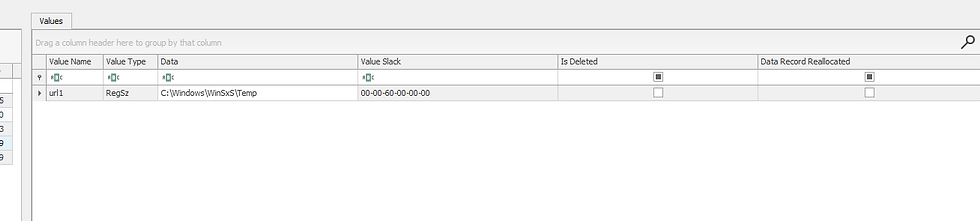
What you'll find in here regularly:
Network share paths using UNC format (\\hostname\share) — revealing mapped or unmapped network locations the user navigated to directly
External drive letters (D:\, E:\) — potentially identifying removable media in use during the investigation window
Hidden or deeply nested folders that a casual user would never find by browsing
IP address-based paths that may correlate with specific network events in other logs
If a path appears here, someone with access to that user account typed it or pasted it. Intent is essentially baked in.
Common Dialog Keys: Cross-Application File Activity in One Place
Now we step up to the most comprehensive of the three artifact families: the Common Dialog keys. This is where Windows forensics gets genuinely elegant.
Almost every Windows application — browsers, office suites, media tools, encryption software, forensic tools themselves — uses Microsoft's Common Dialog Box Library when presenting open and save file dialogs to the user. It's a shared system-level component. And because it's shared, all of that file interaction gets recorded in a single consistent location, regardless of which application triggered it.
Think about what that means: instead of chasing application-specific file history across dozens of different registry locations, you get one unified view of nearly everything a user has opened or saved across their entire application ecosystem.

OpenSavePidlMRU: Reading the File Extension Story
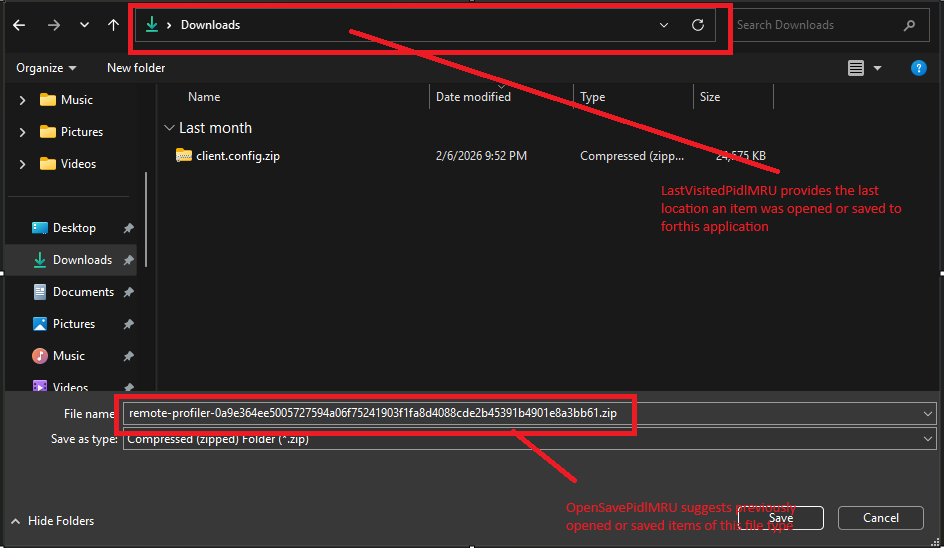
OpenSavePidlMRU answers what files
The extension-based organization of OpenSavePidlMRU is one of those forensic design features that rewards careful analysis. At a glance you can see every file type that's been touched through a dialog box — and certain extensions immediately flag areas of interest.

A ps1 subkey tells you PowerShell scripts have been opened or executed through a dialog.
A pst subkey means archived email files.
A exe subkey is worth scrutinizing — running executables through the open dialog is atypical behavior.
A dmp subkey could mean memory dumps.

The * wildcard subkey deserves special attention because it cuts across all extensions — the last 20 files regardless of type. It's the broadest net, and often catches things that wouldn't appear in any specific extension subkey because the extension is unusual or absent entirely.
LastVisitedPidlMRU: The Application Witness List
LastVisitedPidlMRU answers which applications — and that combination is powerful.
Every application that's ever used a Windows common dialog to open or save a file leaves an entry here. Not the specific file, but the application executable name and the last folder it pointed to. The investigative implications:
It's a roll call of every application that touched a file dialog, and the last place in the filesystem each one visited. For an analyst building a picture of user activity, it's as close to a behavioral profile as the registry gets.
------------------------------------------------------------------------------------------------------
A Word on the Taskbar Search
Modern Windows muddies the waters slightly with the taskbar search dialog — originally Cortana, later decoupled into a standalone search component. This system-wide search capability touches far more than just local files: it queries the Windows search index, OneDrive, email, installed apps, and browser history simultaneously.
Learn More about TaskbarSearch
Its registry footprint isn't as clean as WordWheelQuery, but items accessed through it do surface in standard Windows artifacts — the RecentDocs registry key, LNK files, Jump Lists, ShellBags, and browser history. The search itself gets cached in per-user AppData locations that vary by Windows version, but the results of that search — the things the user actually clicked on — leave traces everywhere.
The practical takeaway: don't assume a clean WordWheelQuery means no search activity occurred. The taskbar search operates in parallel, and its evidence trail just lives in different places.
------------------------------------------------------------------------------------------------------
Why These Three Artifacts Belong Together
Search reveals that a user was looking for something
TypedPaths shows they knew where it was
ComDlg32 proves they got to it and interacted with it.
Used in isolation, each one tells a partial story.
Used together, they reconstruct the full arc — from the moment a user started hunting for something, through their navigation to find it, all the way to the specific files they opened and where they ultimately saved them.
----------------------------------------Dean-----------------------------------------------------------
Complete Series Below
To Learn In deep check out below blog


Comments