

Email Log Search in Google Workspace – What You Can (and Can’t) See

Now let’s talk about Email Log Search, because this is one of the most commonly used (and misunderstood) tools when you’re investigating phishing, mailbox compromise, or suspicious inbound email.
If a user reports:
“I got a weird email”
This is usually where you end up first.
First thing to understand: the 30‑day rule
Google stores email transaction logs differently depending on how old the email is.
This affects what you can search, how you can search, and what results you’ll get.
Think of it as two different worlds:
Emails within the last 30 days
This is the "easy mode."
✅ No strict search parameters required
✅ You can search:
Sender
Recipient
IP address
Message ID
Google Groups email
Results limited to 1000 messages (screen + CSV export)
Near real-time (usually minutes, sometimes up to 24 hours lag)
This is where you do fast phishing triage.
Emails older than 30 days
This is where things get restrictive.
❌ You cannot search Google Group email
❌ You must search using:
Gmail recipient or
Message ID
✅ No limit on historical depth (can go back years)
Still limited to 1000 results per search
Only post‑delivery details are available
Full delivery history is gone
In other words: you can search forever—but only if you already know exactly what you’re looking for.
-------------------------------------------------------------------------------------------------------
Where Email Log Search lives now
Google recently moved and upgraded the interface.
You’ll now find it under:
Admin Console → [|||]→ Reporting→ Email Log Search
This newer interface gives you:
Better filtering
Faster searches
Cleaner drill-down into message details

If you already have a Message ID, always use it. It’s the fastest and cleanest way to get results.
-------------------------------------------------------------------------------------------------------
What Email Transaction Logs actually show you
Email logs tell you about mail flow, not mailbox content.
You can see:
Inbound and outbound messages
SMTP path details
Sender IP addresses
Delivery status
Whether the message was:
Delivered
Quarantined
Rejected
In the recipient details, you can also see the current state of the email inside the mailbox.
That’s extremely useful when:
A phishing email was delivered
Some users opened it
Others haven’t yet
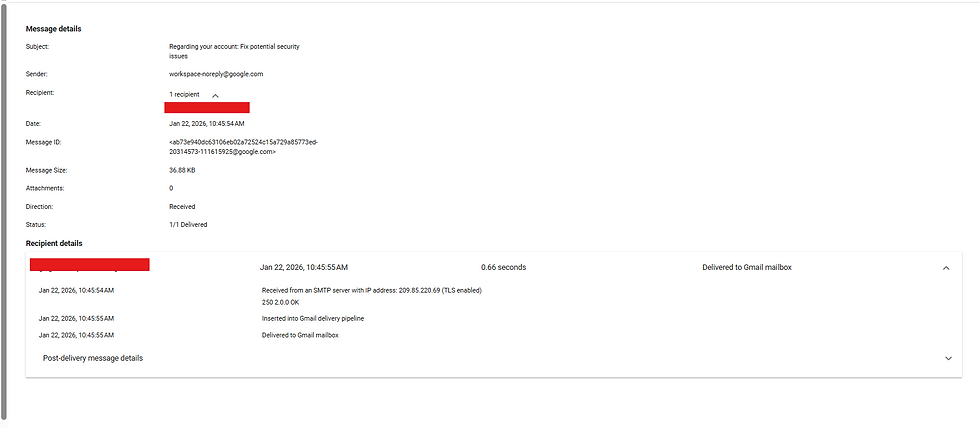
This helps you decide whether to pull the email from inboxes immediately.
-------------------------------------------------------------------------------------------------------
Using Email Log Search for phishing investigations
This is one of the strongest use cases.
Typical workflow:
User reports a phishing email
You grab:
Message ID
Sender address
Sender IP
Search Email Log Search
Identify:
How many users received it
Whether variations were used
If multiple emails came from the same SMTP server
Even if the attacker rotated sender addresses, the IP often stays the same, which makes correlation easier.
Limitation: this method is most effective within 30 days of delivery.
-------------------------------------------------------------------------------------------------------
Quarantined and blocked email (the invisible stuff)
Here’s a really important thing many admins miss:
Some emails never reach user mailboxes at all.
Google’s Gmail gateway evaluates messages before they enter Workspace storage. If an email is blocked at this stage:
❌ It will not appear in Vault
❌ It will not appear in Quarantine
❌ It cannot be recovered
It will only appear in Email Log Search.
Attachment-based blocking
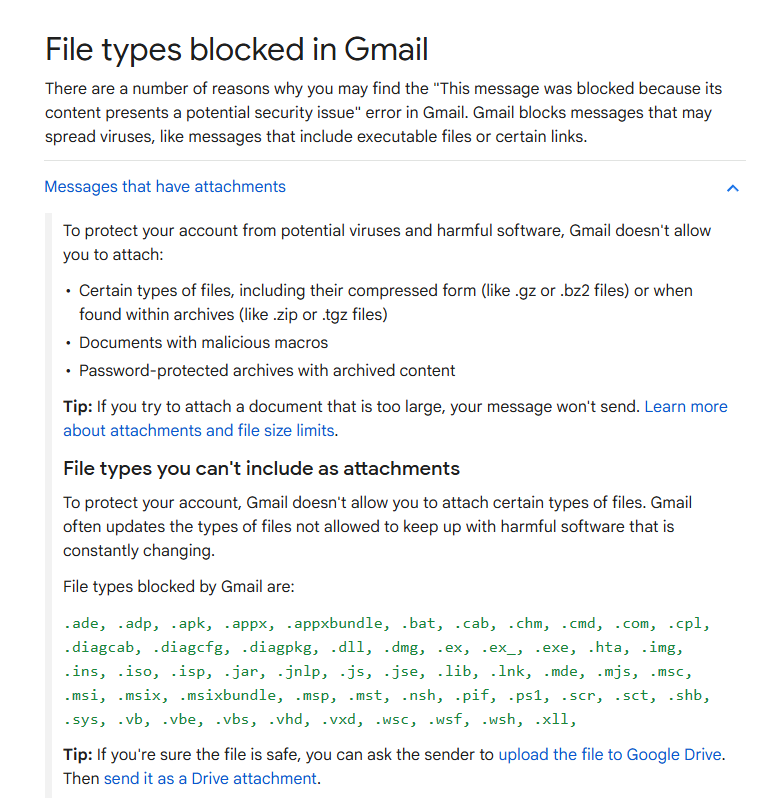
Gmail automatically blocks certain attachment types, including:
Executables
Scripts
Certain archive contents
This also applies when:
The file is inside a ZIP
The ZIP is not password-protected
Google will even attempt to brute-force common ZIP passwords like:
infected
malware
If it can open the archive and finds a blocked file type, the email is rejected.
No notification is sent to:
The user
The admin
The sender
Email Log Search is the only place you’ll ever see it.
-------------------------------------------------------------------------------------------------------
Why this matters during investigations
During IR, you’re often asked:
“Did anyone receive this email?”
“Was it delivered or blocked?”
“Can we retrieve it?”
Email Log Search helps you answer all three—but you must understand its limits.
Once Gmail blocks an email at the gateway:
It never becomes evidence you can collect.
You can only prove that it was blocked.
-------------------------------------------------------------------------------------------------------
Final takeaway
Email Log Search is:
Excellent for phishing response
Powerful for mail flow analysis
Extremely time-sensitive
But it is not a mailbox forensics tool.
Think of it as your email traffic CCTV—it tells you what passed through the door, not what’s stored inside the room.
Used correctly, it’s one of the most valuable tools in Google Workspace investigations.
------------------------------------------Dean--------------------------------------------------------


Comments